• AI Search
  • Cryptocurrency
  • Earnings
  • Enterprise
  • About TechBooky
  • Submit Article
  • Advertise Here
  • Contact Us
TechBooky
  • African
  • AI
  • Metaverse
  • Gadgets
Generic selectors
Exact matches only
Search in title
Search in content
Post Type Selectors
Search in posts
Search in pages
  • African
  • AI
  • Metaverse
  • Gadgets
Generic selectors
Exact matches only
Search in title
Search in content
Post Type Selectors
Search in posts
Search in pages
TechBooky
Generic selectors
Exact matches only
Search in title
Search in content
Post Type Selectors
Search in posts
Search in pages
Home General App

YouTube Now Lets Android Users Skip Video By Chapters With A Two-Finger Double-Tap

..streaming videos by chapters with double-tapping gestures is exclusive for Android beta.

Emeka Eni by Emeka Eni
August 10, 2021
in App
Share on FacebookShare on Twitter

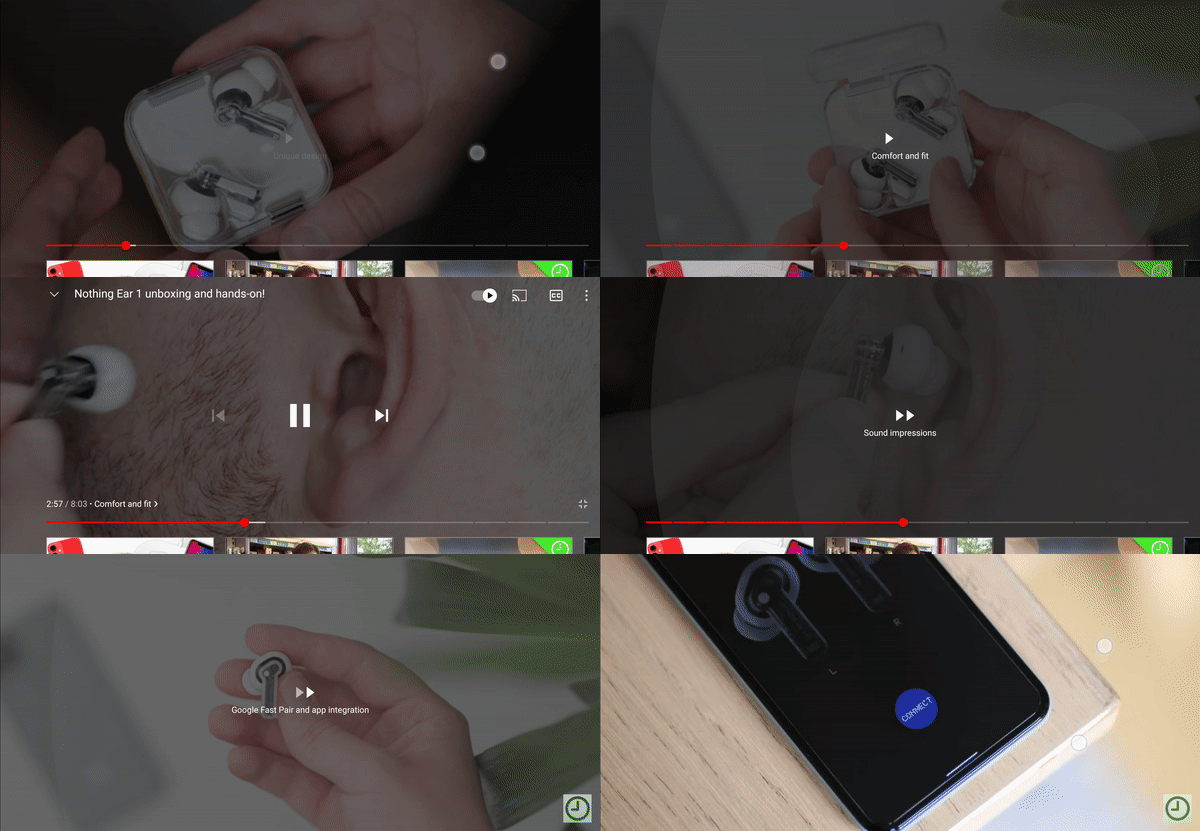
Google’s YouTube has modified its stream console with neat gestures to enable users to drag the video cursor to their most preferred chapter. Now, the Google streaming app lets you adjust its video chapter without dragging the cursor, but with your two fingers tapping on the screen simultaneously, you can make neat scene adjustments.

This double-tap gesture with two fingers is closely related to the previous scrubbing gesture YouTube recently enabled for its streaming services. This feature appears to be neatly enhanced that warranted YouTube users to debate the essence of this feature on Reddit.

It is worth noting that you can either choose to skip a video scene forward or backward with your two fingers double-tapping on your screen to move your cursor to the next in-video chapter. This gesture will only work if the video you are watching has a breakdown of chapters embedded by its creator.

The two-finger double-tap gesture on YouTube is a lucrative measure to control your streams to your most preferred scene. Techbooky suggests your YouTube player window should be on landscape mode for ease of video cursor navigation. Else, the compact portrait YouTube player window restricts the smooth two-finger double-tap gesture.

Per TechBooky’s consent about YouTube streaming gestures, you cannot skip a video for ten seconds when you double-tap with your two fingers. Instead, it moves your video cursor to the next chapter. Double-tapping with a single finger only pushes your cursor ten seconds ahead of the current scene, which has been an existing gesture on YouTube.

To move your cursor forward to the next chapter on YouTube, double-tap on the right side of the screen. You can as well move backward when you double-tap the left side of your screen. Remember, a single tap only moves your cursor ten seconds ahead.

Google is yet to release this feature whereby other tech experts have discovered adjusting video cursor by chapters on YouTube for Android beta v16.31.35 version. Per 9to5Google’s report, this double-tapping gesture is unrelated to other features Google’s YouTube recently developed. 

Related Posts:

  • Gemini_Live
    Android Tests Gemini Live Gesture Shortcut
  • youtube-premium
    YouTube Is Testing A “Jump Ahead” Feature Powered By AI
  • 0098-ARVR-XR-Blog-Header-2096x11.width-1200.format-webp
    The Android XR Operating System for Mixed Reality…
  • Apple-Watch-S9-carbon-neutral-lineup-230912_big.jpg.large
    The Newly Unveiled Apple Watch Series 9 Features an…
  • youtube money making
    YouTube's Ad Revenue Increases To Almost $10 Billion
  • 05cAYKK7zk3e4e9cS9FFEn0-82
    ChromeOS Gains Multitasking & Wi-Fi Traffic…
  • youtubelead2
    YouTube Enforces Longer Ads for Users with Ad Blockers
  • spotify-deal-page-467x316
    Google Gemini Spotify Extension Rolls Out Search…

Discover more from TechBooky

Subscribe to get the latest posts sent to your email.

Tags: androiddouble-tapgooglestreamyoutube
Emeka Eni

Emeka Eni

I am a tech enthusiast, creating contents, graphic designer and am Africa.

BROWSE BY CATEGORIES

Receive top tech news directly in your inbox

subscription from
Loading

Freshly Squeezed

  • Adobe Unveils Firefly AI Assistant To Orchestrate Creative Cloud Workflows April 15, 2026
  • Snap Cuts 16% of Workforce as AI Reshapes Company Strategy April 15, 2026
  • Samsung’s 2026 Micro RGB 4K TVs Start at $1,600, Top Out at 85 Inches April 15, 2026
  • Anthropic’s Momentum Puts Fresh Pressure On OpenAI’s Sky‑High Valuation April 15, 2026
  • NDPC Probes Loan Shark Operators On Data Breach Policy April 15, 2026
  • Insolify Introduces Low-Latency AI Payments for Weak Networks April 15, 2026
  • Survey: 43% of AI‑generated Code Changes still Break in Production April 15, 2026
  • Mastodon Announces Plan To Add End-To-End Encryption For DMs April 15, 2026
  • OpenAI Rolls Out GPT-5.4-Cyber with Trusted Access Program to Control Powerful AI April 15, 2026
  • Google Launches Desktop App for Windows with AI Search Built In April 14, 2026
  • Cloudflare Boosts Developer Security with Shift-Left and AI-Driven Protections April 14, 2026
  • Study Finds Most Australian Teens Are Still Using Banned Social Media Platforms April 14, 2026

Browse Archives

April 2026
MTWTFSS
 12345
6789101112
13141516171819
20212223242526
27282930 
« Mar    

Quick Links

  • About TechBooky
  • Advertise Here
  • Contact us
  • Submit Article
  • Privacy Policy
Generic selectors
Exact matches only
Search in title
Search in content
Post Type Selectors
Search in posts
Search in pages
  • African
  • Artificial Intelligence
  • Gadgets
  • Metaverse
  • Tips
  • AI Search
  • About TechBooky
  • Advertise Here
  • Submit Article
  • Contact us

© 2025 Designed By TechBooky Elite

Discover more from TechBooky

Subscribe now to keep reading and get access to the full archive.

Continue reading

Chat with TechBooky AI
💬
TechBooky AI ✕
We use cookies to ensure that we give you the best experience on our website. If you continue to use this site we will assume that you are happy with it.